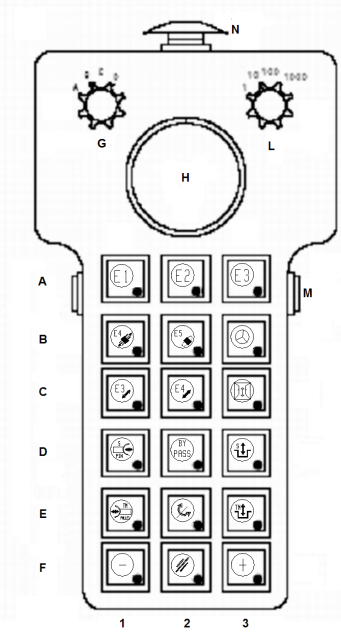
为了保证操作者和机床的安全,只有在NC处于手动模式且按下“主轴暂停”键时才能激 活多功能面板。如再所选得装置上进行手动操作,则带灯
的按钮闪烁。只有当按下按钮(M)才能进行操作。
此面板用于手动检查下列装置:
-Tool change group, Selector G in position A
刀 具交换,G选择器处于A位置
-Movement of PickUp, Selector G in position B
移动附件架,G选择器处于B位置
Check of the tool change group 检查换刀装置
Selector G in position A选择器G处于A位置
N |
Mushroom pushbutton
蘑菇形按钮
|
Emergency pushbutton
紧急按钮
|
M |
Lateral pushbuttons
两侧按钮
|
Enables the use of the panel (they must be pressed contemporarily)
同时按下两侧按钮才能激 活面板
|
G |
Multi-position selector
多位置选择器
|
It selects the device to be operated. 选择进行操作的装置
Position A – Tool change group 位置A-刀 具交换装置
|
A1 | pushbutton-led | Not used未使用 |
A2 | pushbutton-led | Not used未使用 |
A3 | pushbutton-led | Not used未使用 |
B1 | pushbutton-led |
Enables the selection of E4-Axis (pliers-holder saddle)
选择E4轴(刀钳-座 滑座)
LED lits when the axis is selected.
LED亮,轴选中。
|
B2 | pushbutton-led |
Enables the rotation of the pliers刀钳旋转
B2 + F3 Clockwise rotation B2 + F3顺时针选转
B2 + F1 Counterclockwise rotation B2 + F1逆 时针旋转
LERD lits when the pliers rotation is selected
LED亮,刀钳旋转选中。
|
B3 | Pushbutton-led |
Enables the use of electronic handhweel with E4 (B1) selected
E4 (B1)选中时能使用电子手轮
LED lits with the electronic handwheel selected
LED亮,电子手轮选中
|
C1 | Pushbutton-led | Not used未使用 |
C2 | Pushbutton-led |
Enables the inwards/outwards movement of the pliers:
能进行刀钳的内/外翻转。
C2 + F3 Pliers inwards C2 + F3刀钳向内
C2 + F1 Pliers outwards C2 + F1刀钳向外
LED lits with pliers movement inwards/outwards selected
LED亮,刀钳的内/外翻转选中。
|
C3 | Pushbutton-led |
Enables the opening and the closing of the safety door (if present).
安全门(若有)的打开和关闭
C3 + F3 Door opening C3 + F3门打开
C3 + F1 Door closing C3 + F1门关闭
LED lits with safety door selected. LED亮,安全门选中
|